
Official checks · 8 min read
LTSA licence search: check a Lithuanian carrier
Check a Lithuanian transport licence in LTSA’s public Vektra portal using the carrier’s company code. Open the matching goods licence and compare its holder, type, status and validity with your transport order. When the truck is assigned, use the separate registration-plate search to check its licence copy and the carrier linked to it. Company existence alone is not carrier verification.
This guide is for a forwarder checking a Lithuanian carrier before booking. Use the public Vektra searches; the carrier’s account for managing its own licences is a different service.
How to find and read the company licence
Get the Lithuanian company code, legal name, route, vehicle or combination mass and transport dates from the booking documents. Keep the licence scan beside the live result so you can compare the two.
1. Search using the company code, not the VAT number
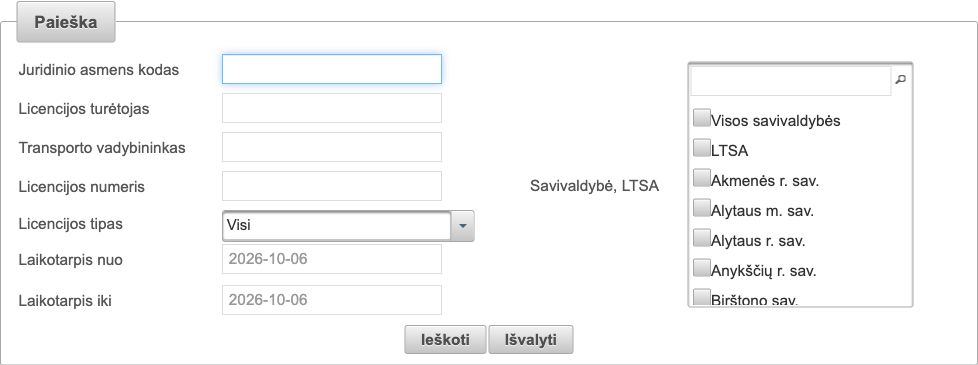
Open Vektra carriers and licences. The field Juridinio asmens kodas means legal-entity code. For a Lithuanian company, use its nine-digit company code. A VAT number beginning LT is a different identifier; do not assume that removing LT always gives the company code. Ask for the company registration details if you only have the VAT number.
Ieškoti means Search and Išvalyti means Clear. Start with the company code and leave unnecessary name, licence-type and date filters unset. If a valid code produces no result, clear restrictive filters before concluding that the licence is absent.
2. Match the holder and the goods licence
Compare the company code and Licencijos turėtojas, the licence holder, with the entity on your order. Licencijos numeris means licence number and Licencijos tipas means licence type. A licence for passenger transport does not answer a goods-transport booking.
For ordinary international EU goods carriage for hire or reward above 2.5 tonnes, including the permitted laden mass of the combination, look for the relevant Community goods licence. National licence categories and exemptions need their own assessment. The Community-licence guide explains the document; this page explains how to find it in Lithuania.
3. Read status and validity together
Read the licence’s status and start and end dates, where published. Match the validity period to the planned transport, then compare the licence number with the carrier’s document. An old scan with a future expiry date does not resolve a suspended or otherwise contradictory live result.
Do not treat an empty value as a confirmed failure. If a date or manager is not visible, record it as unavailable and request clarification where it matters. Transporto vadybininkas means transport manager; this person is not necessarily the driver, dispatcher or owner of the company.
4. Save the result for the booking
Keep the company code, licence number, type, status, dates and check date together in the load file. If the portal cannot be opened or the search does not complete, you have an unfinished check. Retry or obtain confirmation from LTSA rather than recording a missing licence.
How to check the truck’s licence copy by plate
Open the separate Vektra vehicle licence-copy search. Enter the truck or tractor plate in Valstybinis Nr., meaning registration number. VIN kodas is the vehicle identification number field; it is not the company-code field. Compare the carrier code shown in the result with the company you checked, then read the licence and copy numbers, status and validity information where available.
LTSA explains that carriers can link licence copies to vehicles in the system and update the link when the vehicle changes. A plate linked to another operator therefore needs an explanation: confirm the actual carrier, any disclosed subcontracting and the current document before loading.
The EU certified copy travels in the motor vehicle and covers its coupled combination under Article 4 of Regulation 1072/2009. A trailer with a different registration is not, by itself, evidence of an invalid tractor licence copy.
Example: the company matches, but the plate points elsewhere
Suppose the order, VAT details and company licence all identify the same Lithuanian business. The tractor-plate lookup then identifies a different carrier code. This is an illustrative scenario, not a finding about a named company.
Do not fix the mismatch by replacing the company code in your records. Ask who will actually perform the haul and request the current licence copy and explanation of the relationship. If an authorised subcontractor is doing the work, its identity and documents need to be checked too. The original company’s valid licence does not answer that question.
A short Lithuanian field guide
| Label | English meaning | Use it to check |
|---|---|---|
| Juridinio asmens kodas | Legal-entity code | Which company you searched |
| Licencijos turėtojas | Licence holder | The entity on the order and licence |
| Licencijos numeris / tipas | Licence number / type | The document and goods-transport scope |
| Transporto vadybininkas | Transport manager | The named professional role, where published |
| Licencijos kopijos numeris | Licence-copy number | The copy for the assigned motor vehicle |
| Licencijos būklė | Licence status | The status in the vehicle-copy result |
What this licence check leaves open
A Vektra licence result does not confirm company finances, cargo-policy cover, available capacity or who is using the booking email address. A count of copies describes register information; it is not proof of vehicle ownership or availability.
Continue with the Lithuanian carrier verification guide for company, insurance and contact checks. Use the European register guide when the carrier is registered in another country.
Certica
Don't want to do this on every booking?
Certica pulls data from the same registers, checks it, and shows a clear result: what is OK, and what needs clarifying before loading.
Official sources
- LTSA Vektra: carriers and licenceshttps://vektra.eltsa.lt/vektra-portal/web/viesoji-sritis/vezejai-ir-licencijos
- LTSA Vektra: vehicle licence-copy searchhttps://vektra.eltsa.lt/vektra-portal/web/viesoji-sritis/transporto-priemones-licencijos-kopija
- LTSA: linking licence copies to vehicleshttps://ltsa.lrv.lt/lt/naujienos/lietuvoje-veikianti-keliu-transporto-licencijavimo-sistema-pavyzdys-kitoms-europos-salims/
- Regulation 1072/2009: Articles 1 and 4https://eur-lex.europa.eu/legal-content/EN/TXT/?uri=CELEX:02009R1072-20220221
FAQ
Is the Lithuanian company code the VAT number without LT?
Not necessarily. Use the company registration code for the legal-entity search. Confirm it from the registration details rather than deriving it from VAT alone.
Can I search Vektra by truck plate?
Yes, in the separate vehicle licence-copy search. The company-licence search uses the company code. Compare the operator shown by the plate result with the company you are booking.
Does a missing public transport manager prove the carrier is unlicensed?
No. An absent public value does not establish a breach. Read the licence status and obtain clarification from the carrier or LTSA if the missing information affects your check.