
Official checks · 9 min read
Infotrans: check a French transport licence by SIREN
To check a French transport licence in Infotrans, search the actual operator by its nine-digit SIREN. Confirm goods-transport registration, read the appropriate licence and certified-copy information, and compare scope and validity with the booked haul. A commissionnaire listing concerns organising transport and does not alone authorise the firm to perform it as a road carrier. Company existence alone is not carrier verification.
For forwarders and shippers booking a French carrier. Company registration, transport authorisation and cargo insurance answer different questions.
How to check an Infotrans French transport licence step by step
Have the operator’s SIREN, legal name, route, transport dates and maximum authorised vehicle or combination mass ready. If another company supplies the truck, obtain that actual operator’s details too.
1. Distinguish SIREN, SIRET and the VAT number
SIREN has nine digits and identifies the legal entity. SIRET has fourteen digits: the SIREN followed by a five-digit establishment identifier. The licence search needs the operator, not an unverified branch or a group brand.
A standard French VAT number is FR, a two-character key and the nine-digit SIREN. Removing only FR leaves eleven characters, not the SIREN. Obtain or extract the final nine-digit identifier and confirm it against the company documents. VAT validity remains a separate VIES check.
2. Search the matched entity
Open Infotrans. Enter the SIREN in Siren ou nom and click the search icon. A name search needs at least three characters and can return several businesses. Compare the identifier, name and establishment details with the order.
Use recherche avancée when you need filters. March means goods-transport registration, Voy passenger transport and Comm commissionnaire registration. Filters are not mutually exclusive: a company can hold more than one role. Do not assume a positive name result means the business holds the licence you need.
3. Read the goods-transport licence and dates
Open the matching result and read TRANSPORT DE MARCHANDISES. Compare licence type, number, beginning and end of validity with the operation and entire transport period. Do not select a passenger licence because its dates look current.
For ordinary international EU goods haulage for hire or reward over 2.5 tonnes, check the appropriate Community licence and copy, subject to the statutory exemptions. A domestic licence or a light-vehicle authorisation does not establish authorisation for every heavy-truck international route.
4. Interpret certified copies and the transport manager
Read nombre de copies conformes for the relevant licence, and any VUL information for light commercial vehicles. These are published copy counts, not registration plates or proof that a truck is available on your date.
The responsable or gestionnaire de transport is the transport manager. That person need not be the dispatcher arranging the booking. Confirm your contact independently instead of rejecting a legitimate booking because two names differ.
5. Save the result and its publication date
Keep the identifier, licence details, relevant copy information and check date with the transport order. Record Mise à jour des tables, the date displayed at the top. Infotrans uses published ministry tables with separate SIRENE enrichment; it is not a real-time confirmation of every licence change.
If a licence is newly issued or renewed but the published entry is unclear, obtain current documents and appropriate issuing-authority confirmation. An unavailable search is not proof of a missing licence or a positive check.
French licence abbreviations: which column concerns your haul?
Match the licence category to the actual operation. Copy counts from different columns do not all represent the same vehicle category or right. Do not add them together and call the total available heavy trucks.
| Code | French description | Use in your check |
|---|---|---|
| LCM | Licence communautaire marchandises | Community goods licence and copies |
| LTIM | Licence de transport intérieur marchandises | Domestic goods authorisation |
| LCMVUL | Licence communautaire marchandises pour véhicules utilitaires légers | Light commercial vehicle scope; compare maximum authorised mass |
| LCV / LTIV | Passenger licences | Not confirmation of goods haulage rights |
Commissionnaire only, carrier only, or both?
A commissionnaire de transport arranges carriage. A marchandises registration concerns the goods-transport operator. A firm can have both registrations. Decide which role the supplier has in your contract and identify who will perform the haul.
If the supplier is acting as a forwarder without its own truck, request the actual haulier’s SIREN and check that operator’s licence and insurance. A commissionnaire-only result is not automatically evidence of wrongdoing, but it does not complete the executing-carrier check.
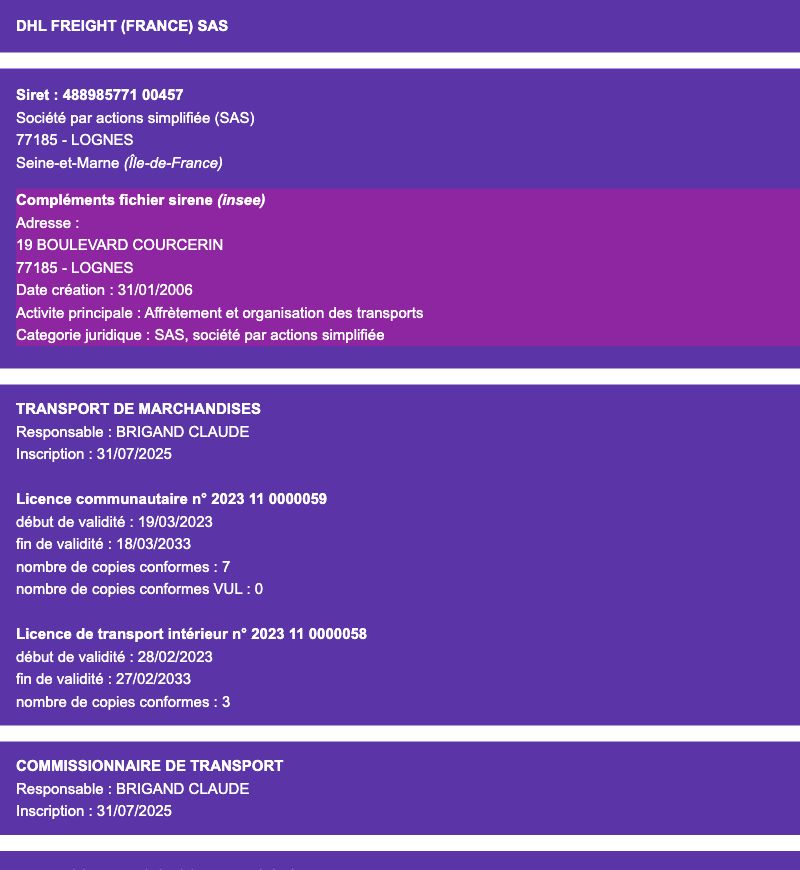
Example: ten vehicles offered, seven Community copies published
Illustrative example, not a finding about a specific business. A supplier offers ten trucks; the matching public record lists seven Community goods copies and three domestic copies. That does not demonstrate ten vehicles authorised for your international heavy-truck bookings.
Ask which operator and vehicles will perform each haul. Check current documents, possible subcontracting and the relevant licence category. Different publication dates or operating arrangements need clarification. A count mismatch alone does not prove fraud.
What Infotrans does not verify
An operator record does not identify the truck at the loading gate, the driver, the sender of an email or the cover for lost or damaged cargo. Ask for the current motor-vehicle copy where required and check the actual operating arrangement. Do not infer French motor-insurance validity from SIV technical vehicle data.
Read the carrier liability policy with its conditions and endorsements: insured entity, dates, territory, goods, limits, exclusions and subcontracting. Continue with the French carrier guide and carrier liability insurance check.
What to do when the company is missing or the licence is unclear
The French ministry’s register publication page explains the national lists and document categories. Read each source with its date. The absence of an entry and a register outage are different observations.
| Finding | Before releasing the load |
|---|---|
| SIRENE company exists, no goods operator entry | Confirm the role, inputs, publication date and required authorisation |
| Commissionnaire only | Identify and check the haulier who actually performs the transport |
| Dates do not cover the transport | Obtain and verify current appropriate licence documents |
| No result or unavailable portal | Keep the item unresolved; repeat or seek authority clarification |
| Licence and copies match | Complete insurance, contact and vehicle checks |
Certica
Don't want to do this on every booking?
Certica pulls data from the same registers, checks it, and shows a clear result: what is OK, and what needs clarifying before loading.
Red flags and common mistakes
Different SIREN on licence and order
Clarify the legal entity and actual operator before relying on the document.
Wrong scope or validity period
Obtain appropriate current authorisation for the booked work.
Executing operator still unknown
A forwarding registration does not identify the haulier supplying the truck.
Official sources
- Infotrans: public search and published-data explanationhttps://infotrans.fr/
- French ministry: national transport and commissionnaire listshttps://www.ecologie.gouv.fr/politiques-publiques/liste-entreprises-inscrites-registre-electronique-national-entreprises
- French ministry: access to the goods-transport professionhttps://www.ecologie.gouv.fr/politiques-publiques/acces-exercice-profession-transporteur-marchandises
- French Finance Ministry: VAT number structurehttps://www.economie.gouv.fr/cedef/numero-tva-intracommunautaire
- French company searchhttps://annuaire-entreprises.data.gouv.fr/
- Regulation 1072/2009https://eur-lex.europa.eu/legal-content/EN/TXT/?uri=CELEX:02009R1072-20220221
FAQ
How do I check a French haulier licence by SIREN?
Enter the nine-digit SIREN in Siren ou nom on Infotrans, open the matching entity and read goods-transport registration, the relevant licence, dates and copies. Compare them with the executing operator and booking.
Can I obtain SIREN just by removing FR from the VAT number?
No. A standard French VAT number also includes a two-character key. SIREN is the final nine-digit identifier. Confirm it against the company’s documents.
Does a commissionnaire listing mean the company cannot organise transport?
No. It concerns a forwarding role. If the business organises rather than performs the carriage, identify and verify the actual haulier separately.
Does the public copy count identify registration plates?
No. It is published licence-copy information. Request the document for the assigned motor vehicle and establish which operator performs the haul.
Does the Infotrans transport manager have to be my booking contact?
No. The transport manager and dispatcher can be different people. Confirm the contact through an independent company channel.