
Polish registries · 9 min read
How to verify a Polish sole trader before booking a carrier
Most Polish carriers are one-person businesses, and you find their details in CEIDG, not in KRS as you would for companies. This guide shows step by step how to download the printout, which fields to review, and which information should warn you before accepting the order, even if you do not speak Polish.
Looking for a CEIDG login to update your own sole-trader record? Open the CEIDG public search. This guide is for a forwarder checking a Polish carrier before a load.
Need a shorter checklist without screenshots? KRS and CEIDG company check for Polish carriers
In short
What the sole-trader register shows
A CEIDG printout helps confirm that a sole-trader business is still active and helps assess whether it is worth accepting an order with that carrier. You can do that in the following 8 steps.
Step 1
Pull the printout from CEIDG
In the Business database tab (Baza przedsiebiorcow), enter the NIP, click Search, choose the right company, open Details, scroll to the bottom of the page, and click Download PDF (Pobierz PDF). Use that downloaded file for the next steps.
Step 2
Check the file download date
A download date should appear at the bottom of every page of the printout. The document must be pulled for the check you are doing now.
Step 3
Check the business status
In the Status of individual business activity section (Status indywidualnej dzialalnosci gospodarczej), the status should be Active (Aktywny).
Step 4
Check the start date
A business running for less than a year is not a block, but a warning worth clearing up.
Step 5
Check the blocking dates
Suspension, cessation or removal from the register. Any filled-in date should draw our attention.
Step 6
Check the business PKD code
A carrier’s primary PKD code is usually 49.41Z, road freight transport.
Step 7
Check the transport permits
In the licences section you should see a transport licence and the authorisation to pursue the occupation of road haulage operator.
Step 8
Check prohibitions and insolvency
The Prohibitions field and the bankruptcy and restructuring field should both say no entries (brak wpisow).
What is a CEIDG printout?
CEIDG (Centralna Ewidencja i Informacja o Dzialalnosci Gospodarczej) is Poland’s register of sole traders and partners in civil-law partnerships. If your carrier runs the business as an individual, this is where you find them. Companies, for example a limited liability company (sp. z o.o.), are not in CEIDG; you check those in KRS.
Unlike the full KRS extract, a CEIDG printout does not show a history of changes. It is a snapshot of the state on a given day. So verification means checking a few specific fields: the status, the dates, and the entries that block the cooperation.
- Additional data: the business status and the dates of suspension, cessation and removal.
- Start date: shows how long the business has run.
- PKD codes and permits: whether the activity is transport and whether there is a carrier licence.
- Prohibitions and the bankruptcy and restructuring field: serious risk signals.
How to think about the printout
A CEIDG printout is not a company business card. It is the state of the register on a given day. If one of the key fields is filled in or the status is not active, pause the process and clear the matter up before booking.
Step 1: pull the printout from CEIDG
Go to CEIDG public search. In the Business database tab (Baza przedsiebiorcow), enter the NIP, click Search (Szukaj), choose the right company, then open Details (Szczegoly), scroll to the bottom of the page, and click Download PDF (Pobierz PDF). Use the downloaded file for the next steps.
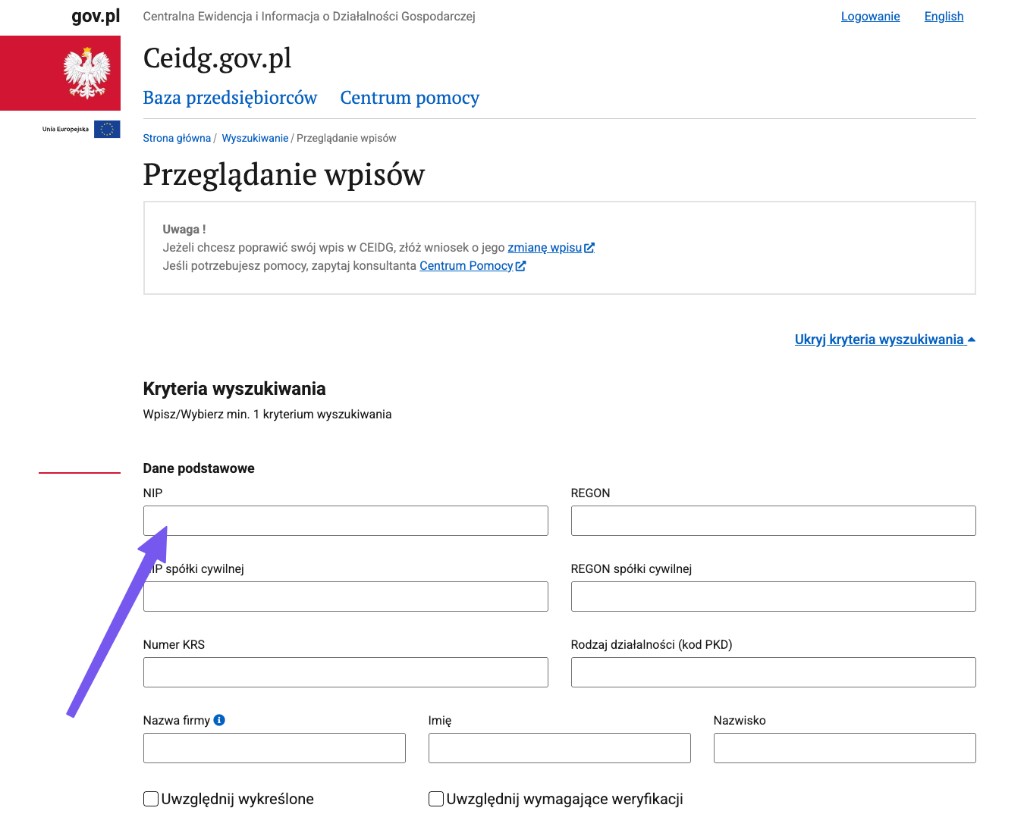
What to look at: Enter the tax number in the criteria field. You can also search by surname or business name.
Next: Once you find the entry, go to the results and open the entrepreneur details.
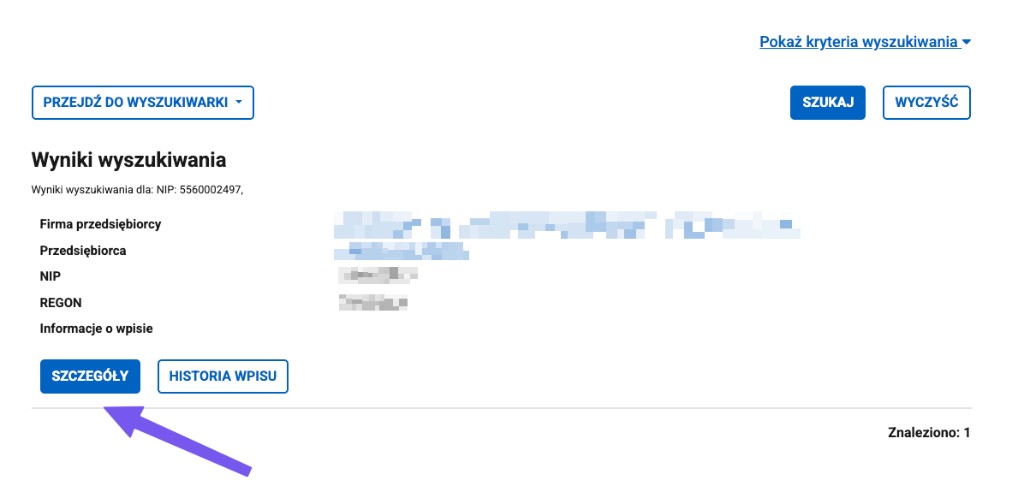
What to look at: Whether this is the right entrepreneur and whether the tax number matches the order.
Next: Click the details button (Szczegoly), scroll to the bottom of the page, then download the PDF printout.
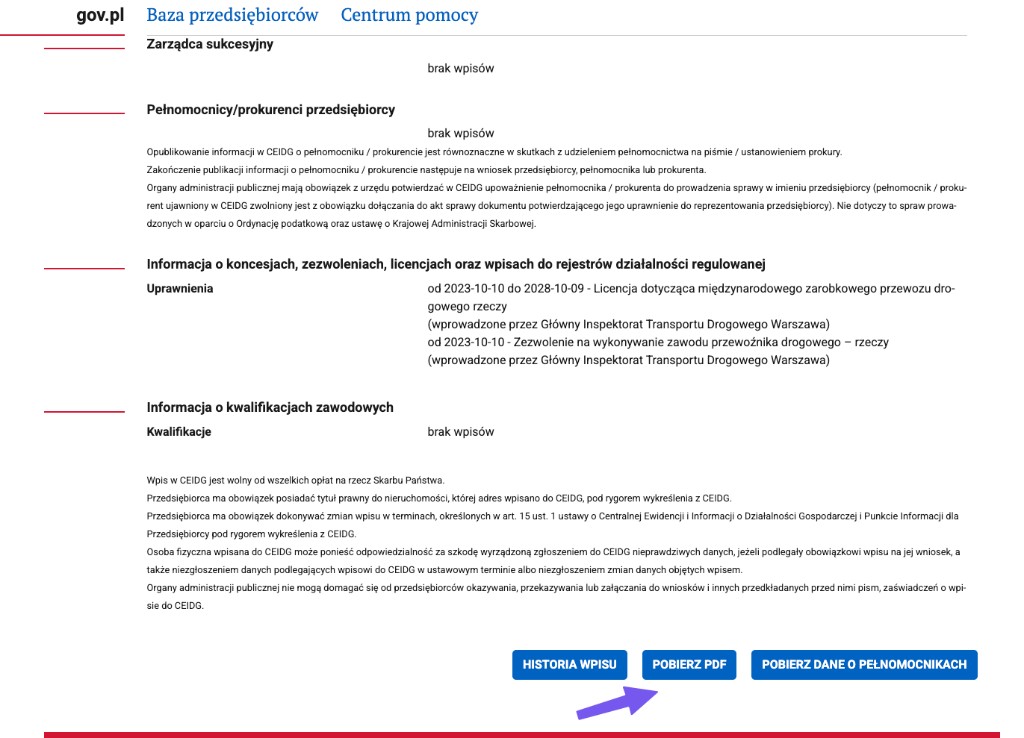
What to look at: The download PDF button (Pobierz PDF) at the bottom of the entry. The permits section with the carrier licence shows here too.
Next: Download the PDF. On it you check the status, dates and the remaining fields.
Step 2: check the printout is current
The printout shows the state of the entry on a given day. At the bottom of every page, there should be a file download date next to the note that the printout reflects the state of the entry on a date. The document should be pulled for the check you are running now.

What to look at: The day the entry state is reflected on, plus the file download date shown at the bottom of the page.
Next: Old printout? Pull a current one yourself before you judge the remaining fields.
Step 3: check the status and the blocking dates
The most important part is the additional data section. There you check the status of the sole trader and four dates: start, cessation, suspension and removal from the register.
In a clean entry, the Status of individual business activity section (Status indywidualnej dzialalnosci gospodarczej) should show Active (Aktywny), and the cessation, suspension and removal fields should be empty (a dash). The start date shows how long the business has run. A business running for less than a year is not a block yet, but it is a warning worth clearing up.
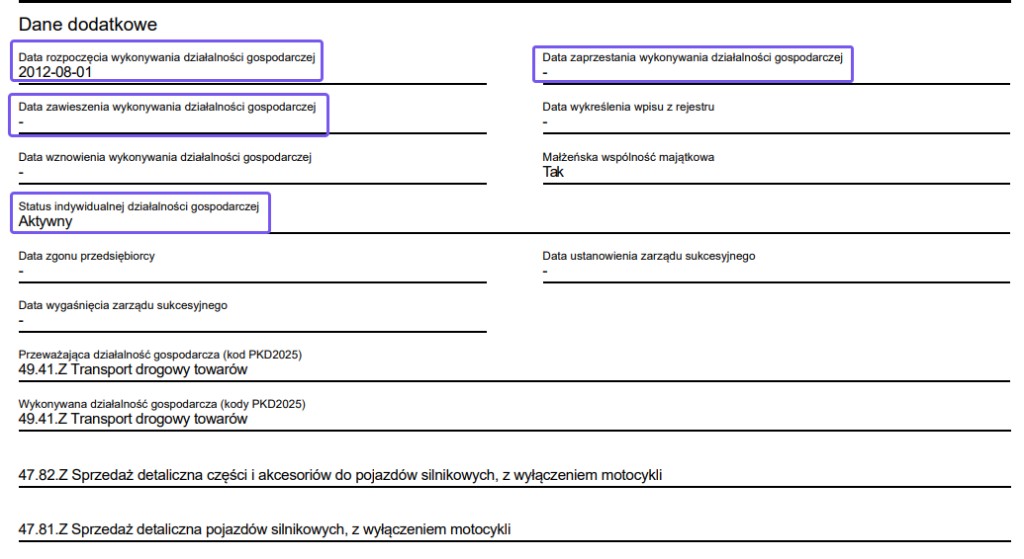
What to look at: The status Active, the start date, and the empty cessation, suspension and removal fields.
Next: If the status is Active and the blocking dates are empty, move on to the PKD and permits.
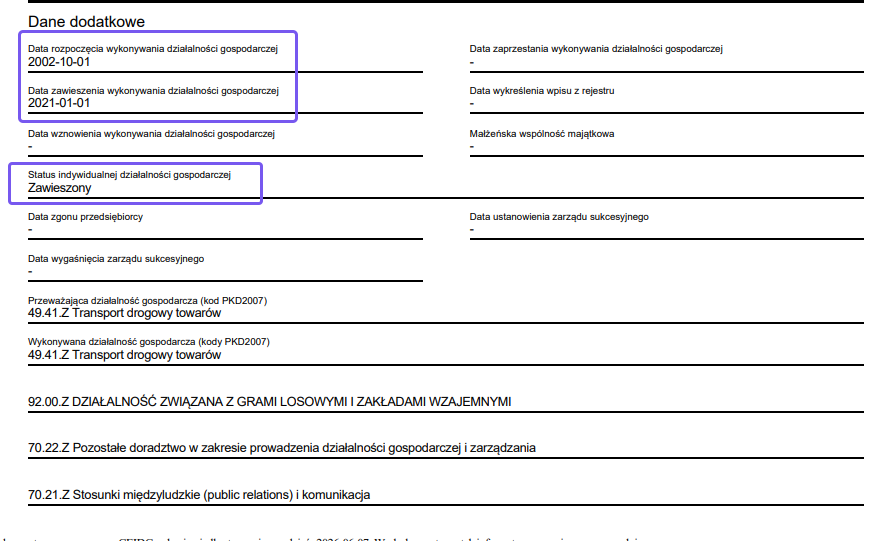
What to look at: The status Suspended (Zawieszony) and a filled-in suspension date. This is a blocking situation.
Next: A status other than Active, or a filled-in date of suspension, cessation or removal, means Stop. Do not book on guesswork.
Which dates block the deal
The suspension date, the cessation date and the date of removal from the register. If any of them shows a date instead of a dash, the business is not fully active and the matter needs explaining before booking.
Step 4: check the PKD and the transport permits
Check the business PKD code. A carrier’s primary business activity is usually 49.41Z, road freight transport. If none of the PKD codes covers transport, ask whether the business actually runs haulage.
Below, in the section on concessions, permits and licences, check the Permits field. In the example it shows a licence for international commercial road freight transport and an authorisation to pursue the occupation of road haulage operator (issued by GITD, the Polish road transport inspectorate). That is a strong signal you are dealing with a carrier, not a random company. You can also see this section in the screenshot from step 1, just above the download button. It is worth confirming the licence number in KREPTD.
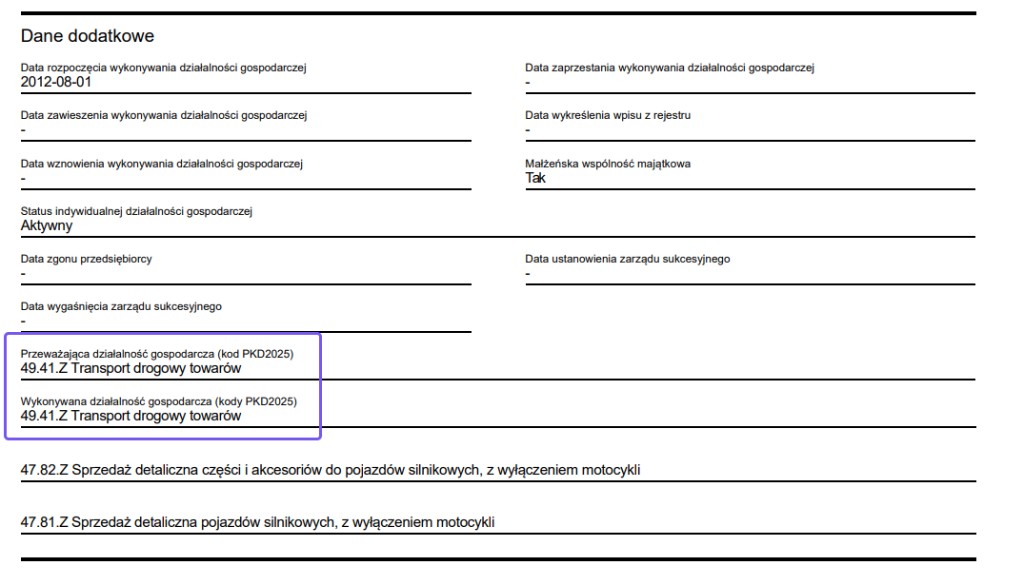
What to look at: Whether the primary PKD is 49.41Z, road freight transport.
Next: No transport in the PKD? Ask whether the carrier actually runs haulage.
Step 5: check prohibitions and insolvency
At the end of the printout you will find the Prohibitions field and the field on bankruptcy, recovery and restructuring proceedings. In a clean entry both say no entries (brak wpisow).
If the Prohibitions field shows an entry, or the insolvency field mentions proceedings, do not interpret it on the fly. Pause the process and clear the matter up before you decide to work with them.
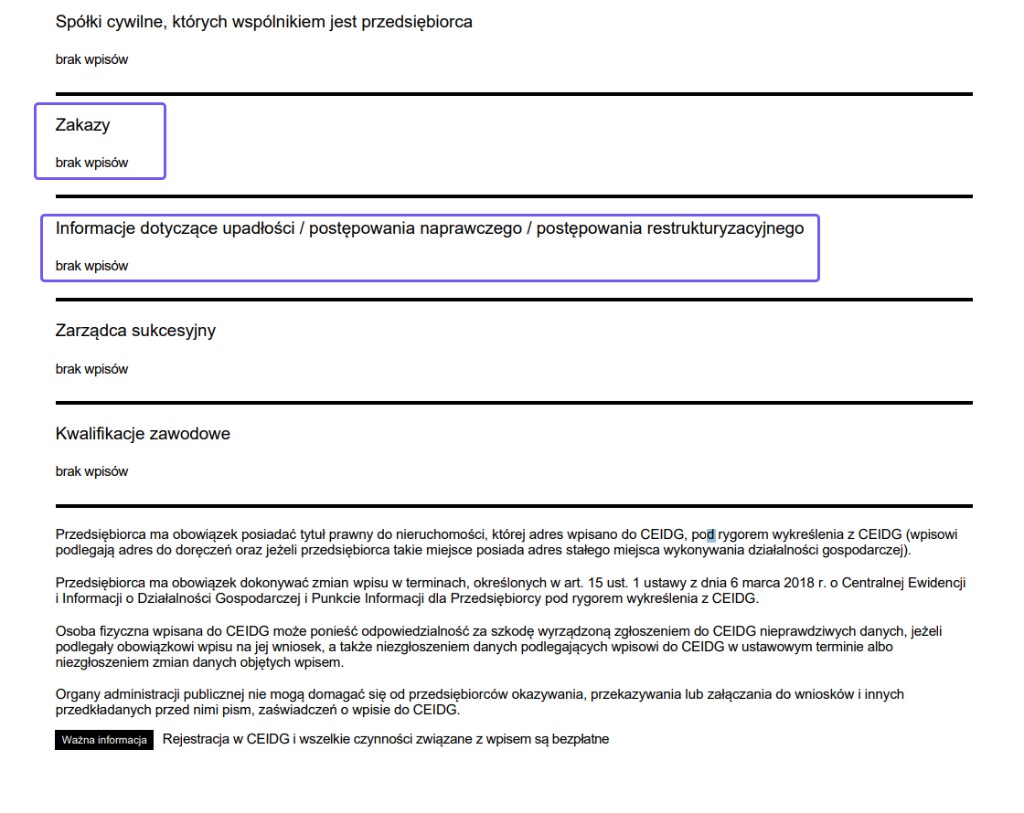
What to look at: Whether the Prohibitions field and the bankruptcy and restructuring field say no entries (brak wpisow).
Next: Any entry in these fields is a Stop signal. Clear the matter up before booking.
Step 6: watch for civil-law partnerships
If the entrepreneur is a partner in a civil-law partnership, you will see it in the section on civil-law partnerships of which the entrepreneur is a partner. It shows the partnership’s tax and statistical number and any date of suspended activity in the partnership.
A civil-law partnership entry on its own does not block the cooperation, but it is worth knowing that part of the carrier’s activity may run in another entity. Establish who you are issuing the order to and who will actually perform the haul.
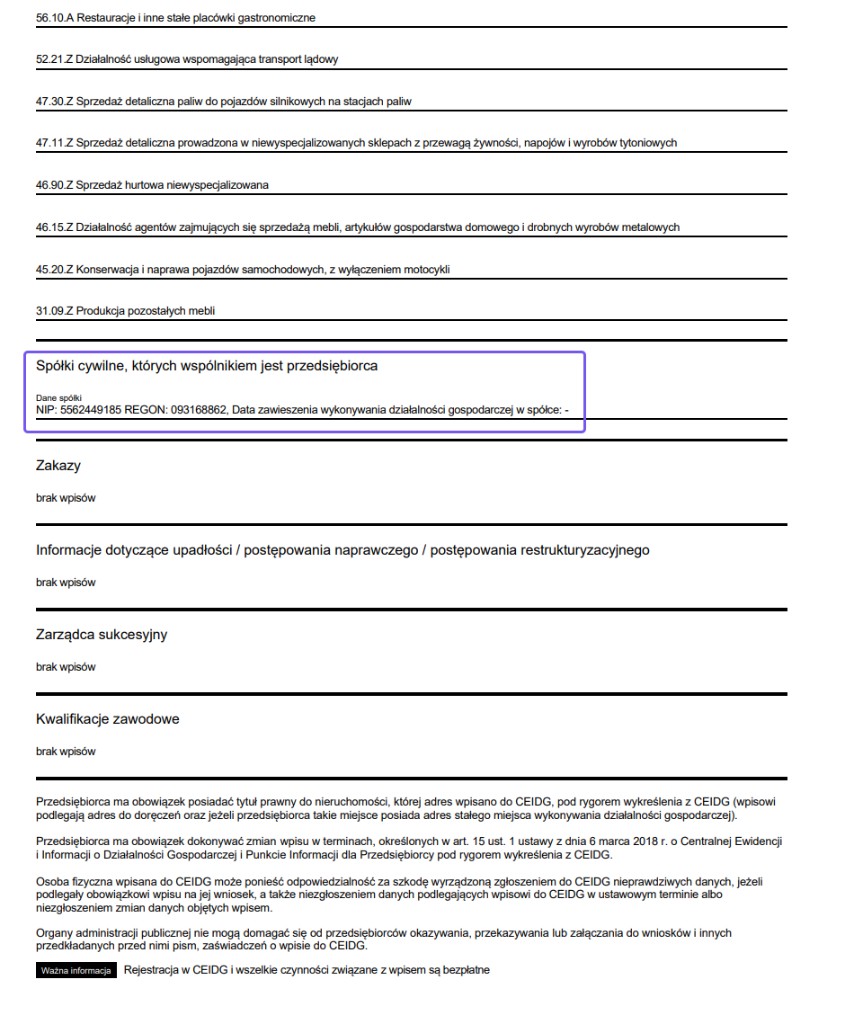
What to look at: Whether the entrepreneur is a partner in a civil-law partnership and what its tax number is.
Next: Establish whether the order concerns the sole trader or the civil-law partnership.
CEIDG or KRS?
Sole traders and partners in civil-law partnerships are in CEIDG. Companies such as a limited liability company are in KRS. How to read a full KRS extract is covered in a separate guide: how to verify a Polish limited company.
In summary: how to decide after reading CEIDG
After working through the printout you should be able to answer three questions: is the document current, is the status active with empty blocking dates, and do the Prohibitions and insolvency fields show nothing that cannot be calmly explained.
OK
Status Active, the business has run for more than a year, all blocking dates are empty, the PKD covers transport, and the Prohibitions and insolvency fields say no entries. The printout is fresh.
Ask
The business has existed only briefly, the primary PKD has no transport, the carrier licence is missing, or a civil-law partnership entry shows up. Find out how that affects the order first.
Stop
Status Suspended or removed, a filled-in date of suspension, cessation or removal, an entry in the Prohibitions or insolvency field, or an old printout. Do not book on guesswork.
Certica
Don’t want to do this by hand?
Certica automates the same process: it pulls the same sources, detects risk signals, and shows what needs clearing up before you hand over the load. The PDF report is there for your audit trail and records.
No card required. Most checks complete in 10-40 seconds, depending on the country and registry availability. Some registries may take longer when official services are slow or unavailable.