
Polish registries · 10 min read
How to verify a Polish limited company before booking a carrier
When your carrier is a Polish company (sp. z o.o. or S.A.), its record lives in KRS, the National Court Register. This guide shows you what to download from the Polish portal, where to look, and what should make you pause, even if you do not speak Polish.
Looking up your own company extract or a court-register login? Open the KRS search. This guide is for a forwarder checking a Polish carrier before a load.
Need a shorter checklist without screenshots? KRS and CEIDG company check for Polish carriers
In short
What Poland's company register tells you
A KRS extract will not tell you whether a carrier hauls well. It will tell you whether the company is real, who controls it, and whether the owners or board changed in the last year. We break the extract down into 8 steps.
Step 1
Pull the full extract
Only the full extract (odpis pelny) shows the complete history of changes, not just the current state.
Step 2
Check the extract is current
In the header, check the date, time and KRS number. The document must be the right company and pulled for the check you are doing now.
Step 3
Note the entries from the last 12 months
At the top of the extract, find the numbers of the entries made in the last 12 months.
Step 4
Understand the wprow. and wykr. columns
These two Polish abbreviations show which entry added a fact to KRS and which entry removed it. Compare them with your list of recent entries.
Step 5
Check the shareholders
In Section 1, Box 7, see whether any recent entry number shows up next to shares or a removed shareholder.
Step 6
Check the board
In Section 2, Box 1, see whether any recent entry number relates to board members, roles or removals.
Step 7
Scan sections 4, 5 and 6
This is where you look for arrears, a court-appointed administrator, liquidation, bankruptcy, restructuring or suspension.
Step 8
Cross-check with RAR
The Register of Registry Files shows cases at the registry court. A case from the last 12 months with no matching KRS entry needs explaining.
What is KRS, and who is in it?
KRS (Krajowy Rejestr Sadowy) is Poland’s National Court Register of companies and other entities. For a carrier, you mostly check companies here, for example a limited liability company (sp. z o.o.) or a joint-stock company (S.A.). Note one thing: a one-person business (a sole trader) is not in KRS. You will find it in CEIDG instead, which we cover in a separate guide on Polish sole traders.
In the full extract that we pull for verification, four groups of information matter most:
- The top of the extract shows the history of entries.
- Section 1, Box 7 shows the shareholders and their shares.
- Section 2, Box 1 shows the board.
- Sections 4, 5 and 6 show entries that can be a serious risk signal, such as arrears or company bankruptcy.
How to think about the extract
The full extract is not a tidy company business card. It is a history of changes in the register. So verification means joining two things: when a change happened and what it concerned.
Step 1: pull the full extract
Go to KRS search, enter the company’s tax number (NIP) or statistical number (REGON), and open the entity. You need the full extract (odpis pelny), because only it shows the complete history of changes in this register.
Why this matters
If you read only the current information, you see today’s board, but you cannot easily tell whether the board changed recently. And recent changes are exactly what matters most in this check.
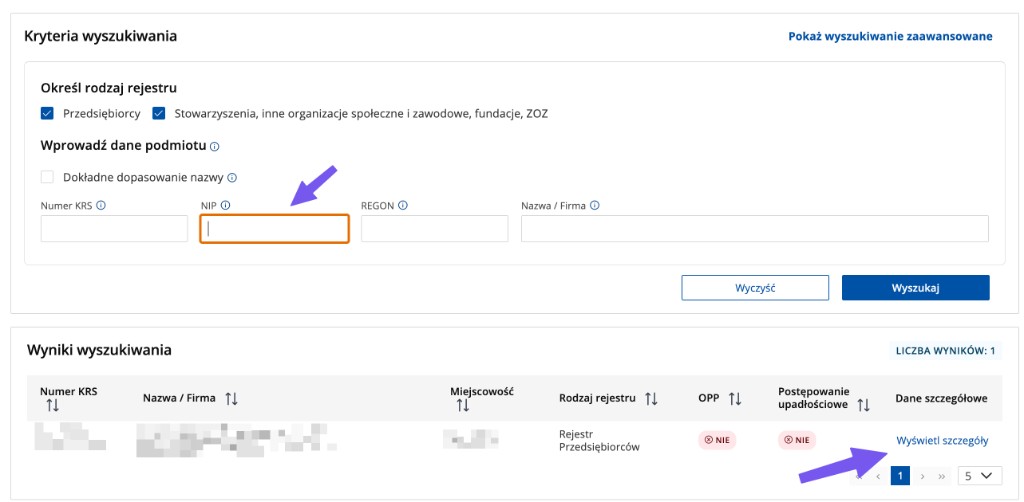
What to look at: Whether this is the right company and whether the result already hints at bankruptcy proceedings.
Next: If the result matches, open the entity details and download the full extract.
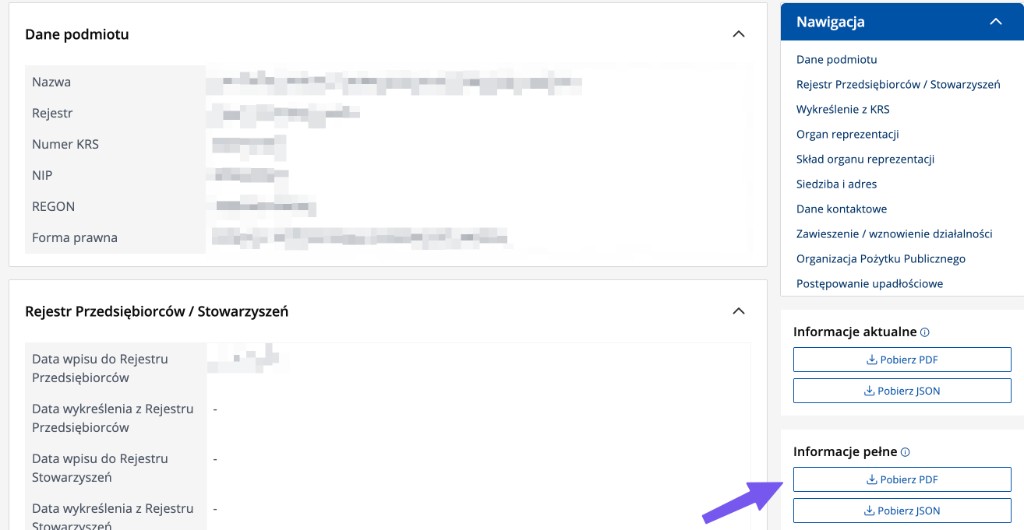
What to look at: Whether you are downloading from the full information section (Informacje pelne), not the current information one.
Next: The full extract holds the history of entries; without it you cannot judge changes in the last 12 months.
Step 2: check the extract is current and is this company
The extract is a snapshot of the register from one moment. First check the date, time and KRS number. The KRS number should match the carrier you are verifying, and the document should be pulled for the check you are running now.
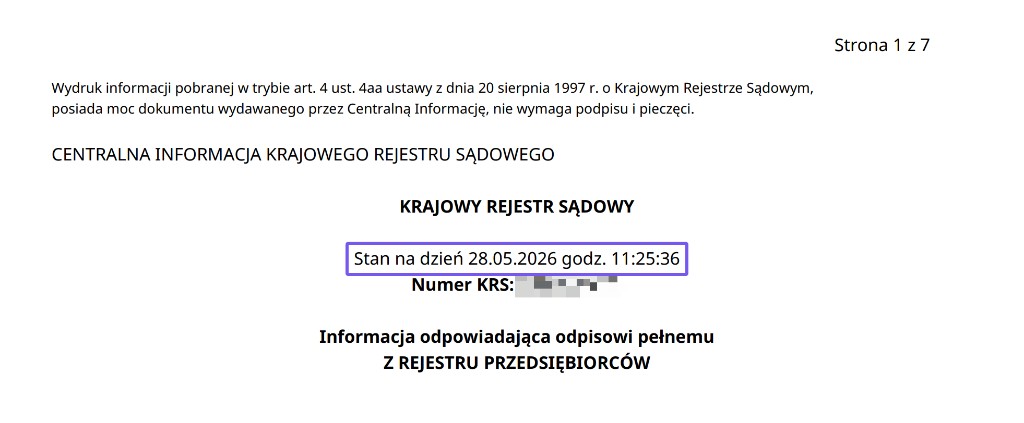
What to look at: The date, the time and the KRS number. You will reuse that number in RAR shortly.
Next: Old PDF or a different KRS number than on the order? Download a current extract yourself.
Step 3: find the entries from the last 12 months
Do not start with the shareholders or the board. First go to the top of the extract and find the list of entries. Write down the numbers of the entries from the last 12 months. These are the numbers you will look for later in the document.
In the example below, entries 6, 7 and 8 are from the last 12 months. All three concern financial statements. That alone does not mean everything is fine. You still need to check whether any of those numbers also shows up next to the shareholders or the board. If a number does not reappear, the company structure probably did not change in the last 12 months.
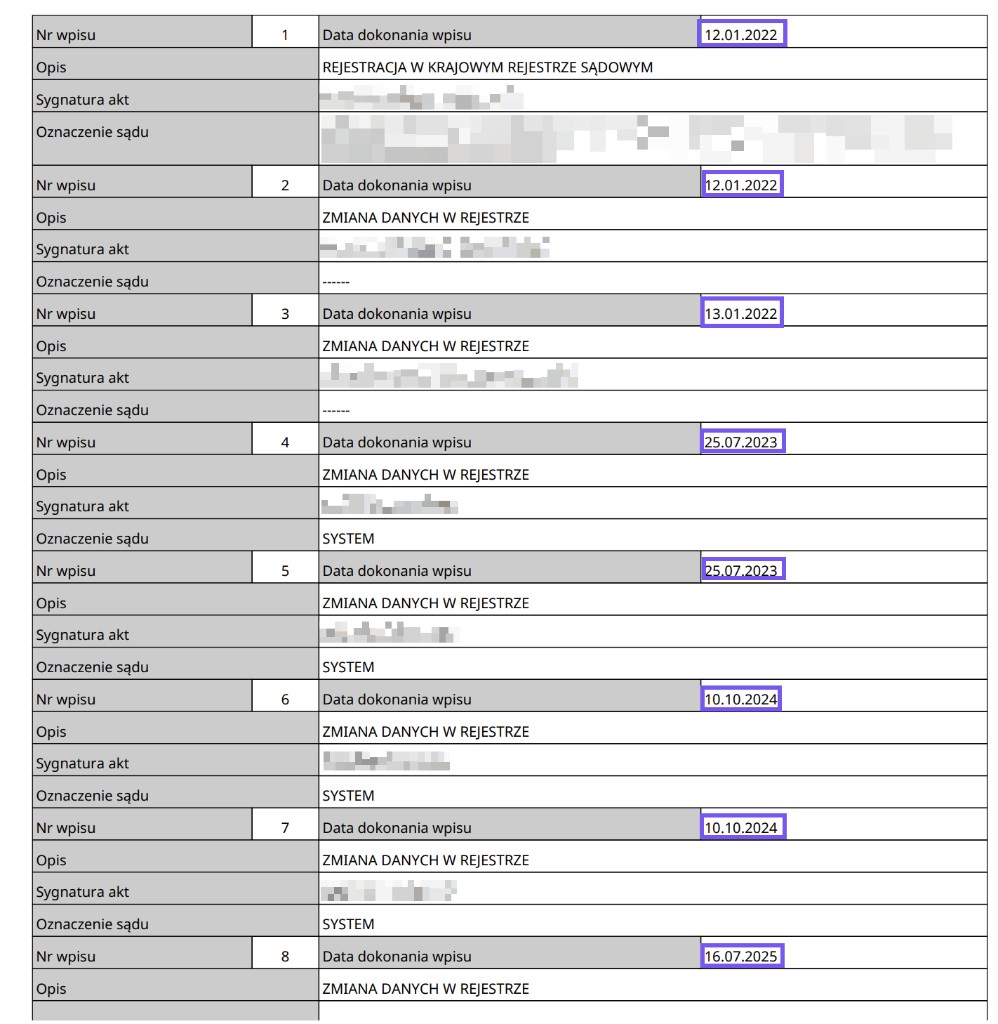
What to look at: Which entry numbers are from the last 12 months and what they concern. Here entries 6, 7 and 8 are financial statements.
Next: Save those numbers. In a moment you will check whether they reappear next to the shareholders and the board.
Step 4: understand the wprow. and wykr. columns
You will often see the abbreviations wprow. and wykr. in the extract. The words themselves are simple: wprow. tells you which entry introduced a fact into KRS, and wykr. tells you which entry removed it. It all makes sense once you compare these numbers with your list of entries from the last 12 months.
| Column | Meaning | What you do with it |
|---|---|---|
| wprow. | The entry that introduced the information into KRS. | If the number is from the last 12 months, check what it concerns. |
| wykr. | The entry that removed the information. | A shareholder or board member removed in the last 12 months needs explaining. |
Example
A board member shows wprow. 21 and wykr. 27. Entry 21 added the person to the board, and entry 27 removed them. If entry 27 is from the last 12 months, the board changed recently and you need to find out what happened.
Step 5: check the shareholders and shares
In Section 1, Box 7 you check who the shareholders are and how many shares they hold. Here you go back to the entry numbers from the last 12 months. If a number from that period appears next to shares or next to a removed shareholder, that is a recent change of ownership.
A change of shareholder is not proof of fraud. It is, however, something worth clearing up before booking: who controls the company now, whether the representation changed, and whether the carrier documents still hold.
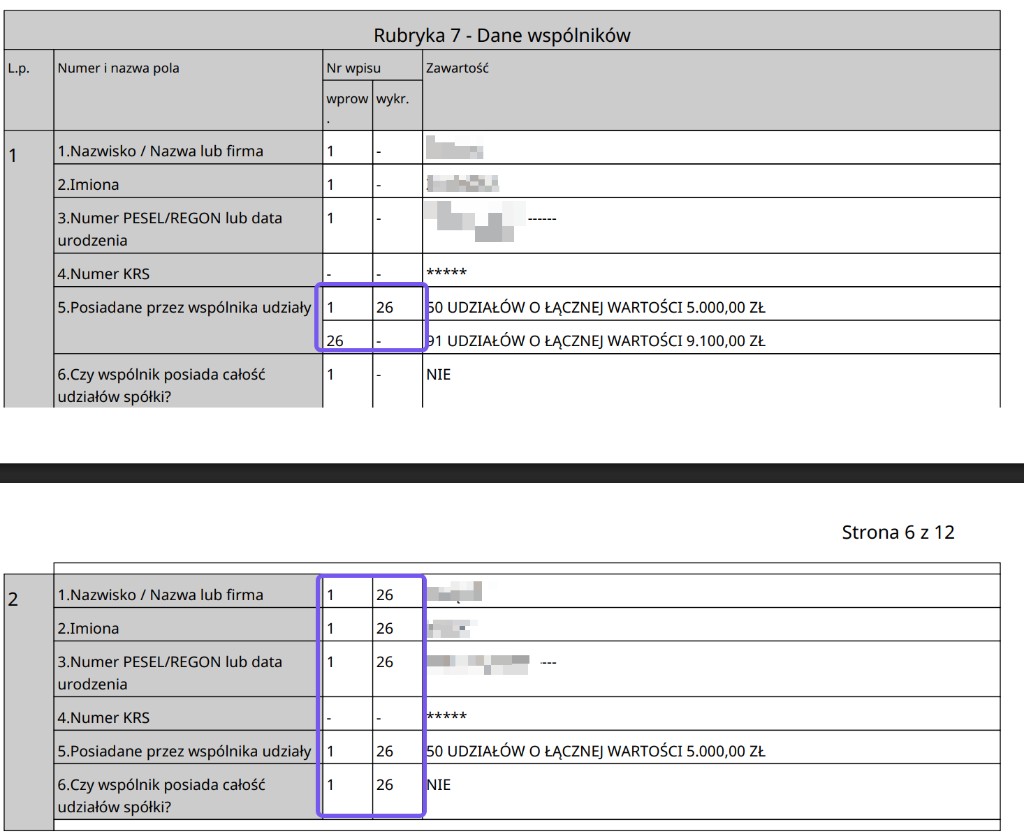
What to look at: Whether an entry number from the last 12 months appears next to shares or a removed shareholder.
Next: A change of ownership in the last 12 months needs explaining before you decide to work with them.
Step 6: check the board
In Section 2, Box 1 you check the board, the people authorised to run the company. The rule is the same: look for entry numbers from the last 12 months next to people, roles and removals.
If the board shows only older numbers, it does not look recently changed. If a wprow. or wykr. from the last 12 months appears, ask who signs documents today and whether your contact really acts on behalf of the company.
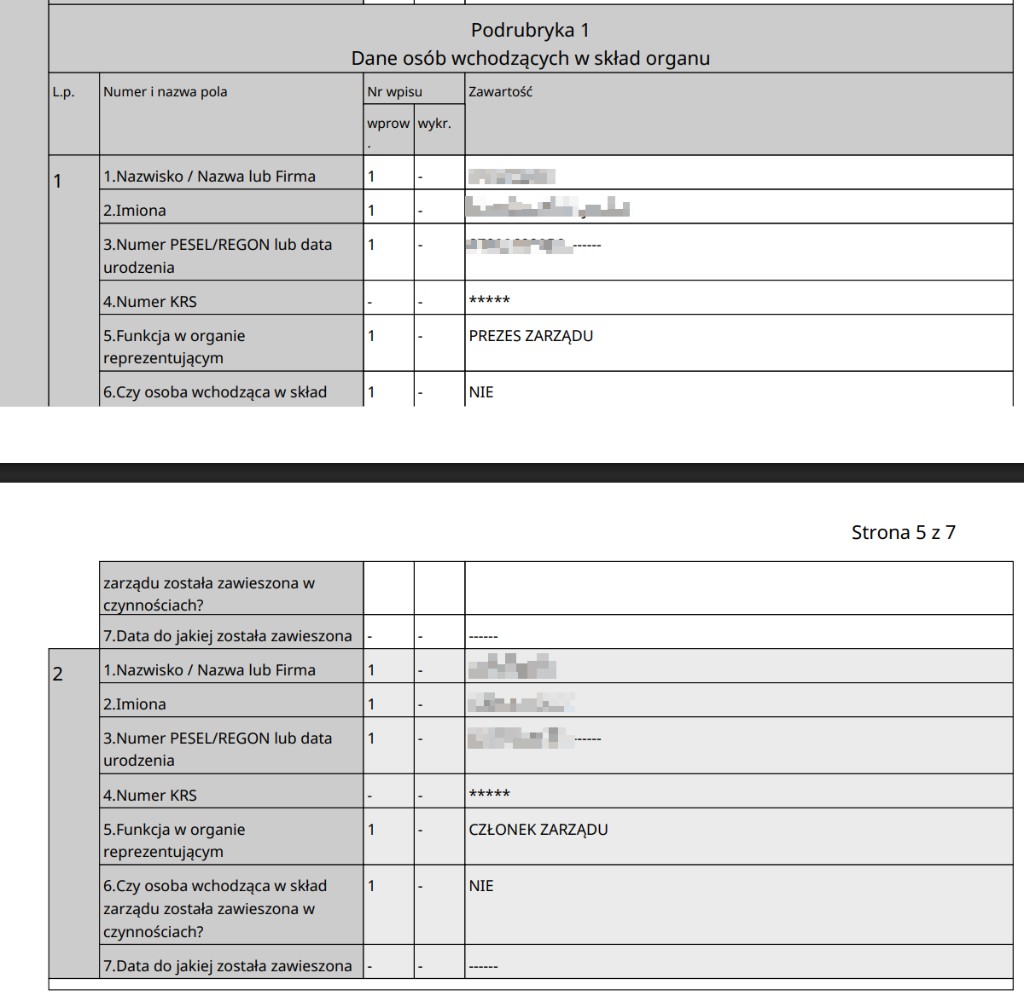
What to look at: Whether the board shows only older numbers, with no removal from the last 12 months.
Next: If the board looks stable, still check sections 4, 5 and 6.
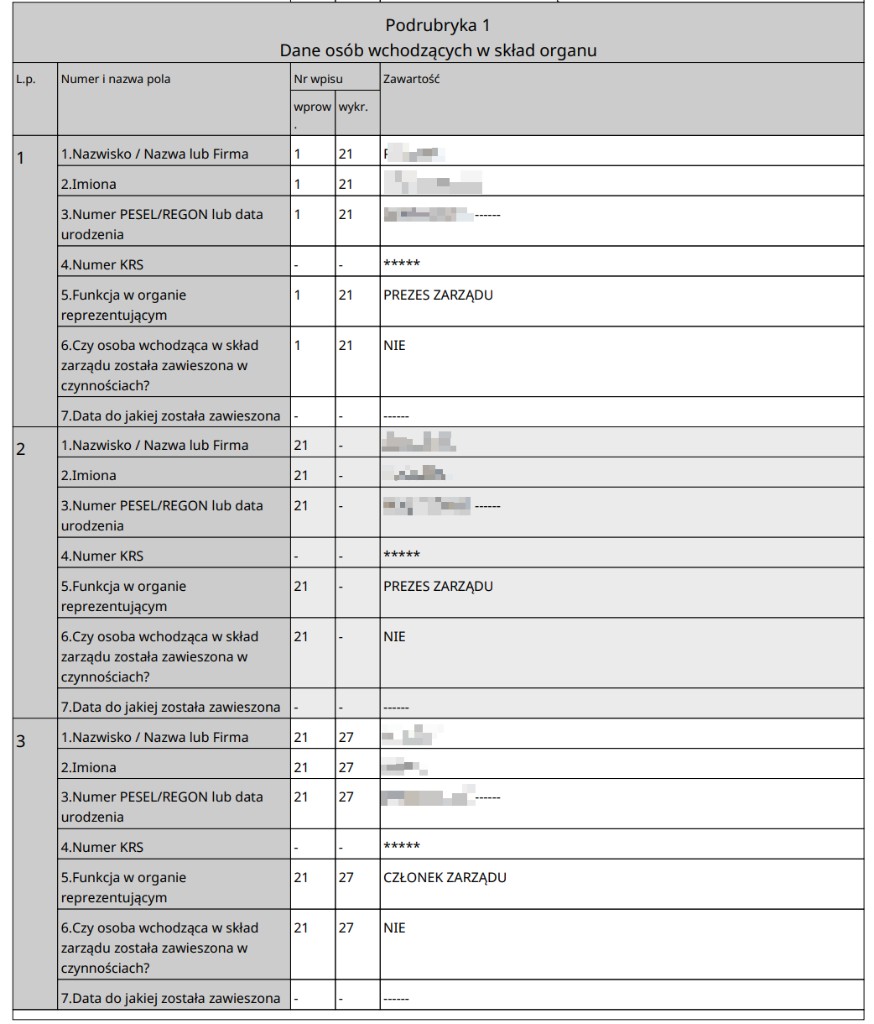
What to look at: Whether the board shows wprow. or wykr. from the last 12 months.
Next: A board change in the last 12 months needs explaining, even when sections 4, 5 and 6 are empty.
Step 7: scan sections 4, 5 and 6
After the shareholders and the board, move to sections 4, 5 and 6. This is no longer about routine organisational changes. Here you look for entries that can seriously affect how safe the cooperation is.
Arrears, receivables, a court-appointed administrator, liquidation, bankruptcy, restructuring or a suspension of activity are not minor details. If you see such an entry, do not interpret it on the fly. Pause the process and clear the matter up.
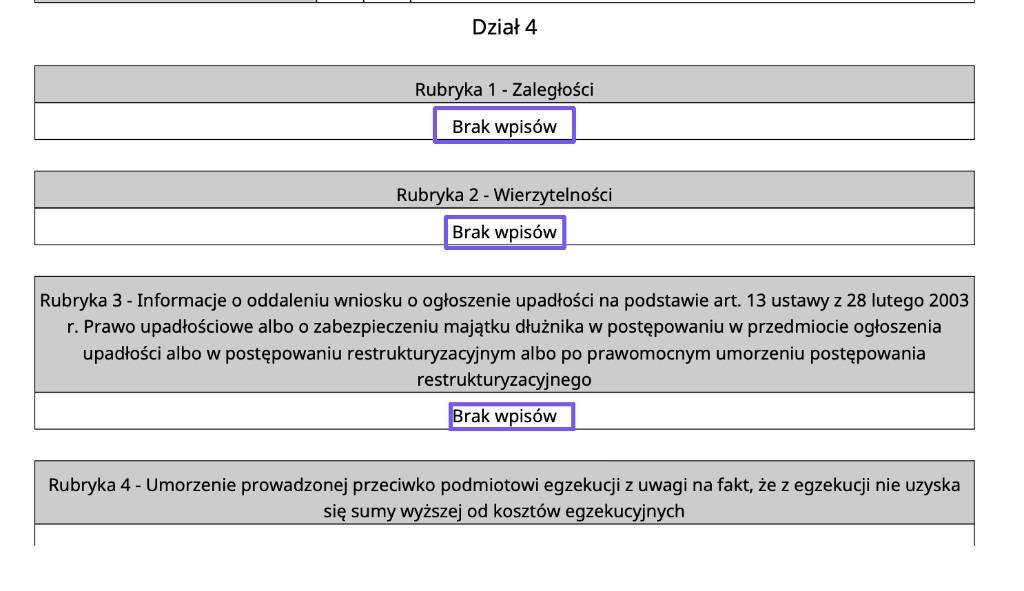
What to look at: Whether Section 4 says no entries (brak wpisow) everywhere.
Next: Section 4 does not block the check if it genuinely says no entries everywhere.
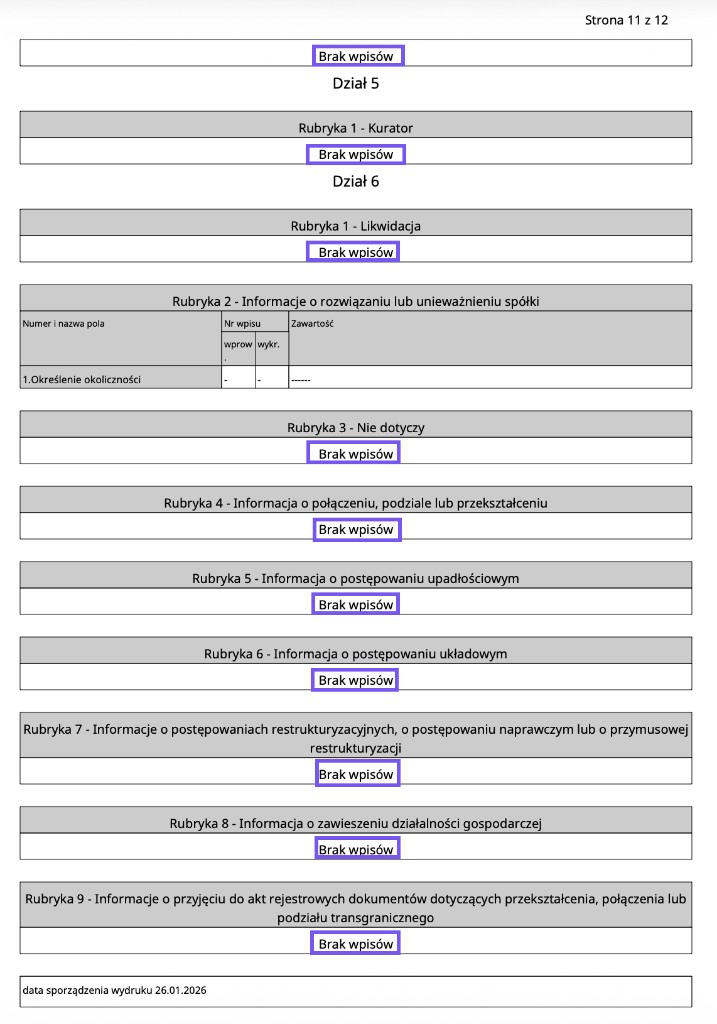
What to look at: Administrator, liquidation, bankruptcy, restructuring and suspension.
Next: If everything says no entries, these sections do not block the check.
Step 8: compare KRS with RAR
RAR, the Register of Registry Files, shows the cases handled for the entity at the registry court. Take the KRS number from the extract header and enter it in the RAR. Focus mainly on cases from the last 12 months.
Compare the case numbers from RAR with the file signatures next to the entries at the top of the KRS extract. If a case from the last 12 months in RAR has no matching KRS entry yet, a change may be in progress. That does not have to mean a problem, but it needs explaining.
How to read it:
- A case older than 12 months and already in KRS: usually does not block the check.
- A case from the last 12 months and visible in KRS: check what it concerned.
- A case from the last 12 months in RAR that is not in KRS: ask, because the change may still be pending.
In summary: how to decide after reading KRS
After working through the extract you should be able to answer three questions: is the document current, did the shareholders or the board change in the last 12 months, and do sections 4-6 or RAR show anything that cannot be calmly explained.
OK
The extract is current, the entry numbers from the last 12 months do not reappear next to owners or the board, sections 4-6 are empty, and RAR shows no open case.
Ask
A recent entry number appears next to the shareholders or the board, or RAR shows a case from this period. Find out what changed and whether the carrier documents still hold before you book.
Stop
Sections 4, 5 or 6 contain entries, the document is old, the company details do not match, or a recent RAR case cannot be explained. Do not book on guesswork.
Certica
Don’t want to do this by hand?
Certica automates the same process: it pulls the same sources, detects risk signals, and shows what needs clearing up before you hand over the load. The PDF report is there for your audit trail and records.
No card required. Most checks complete in 10-40 seconds, depending on the country and registry availability. Some registries may take longer when official services are slow or unavailable.